

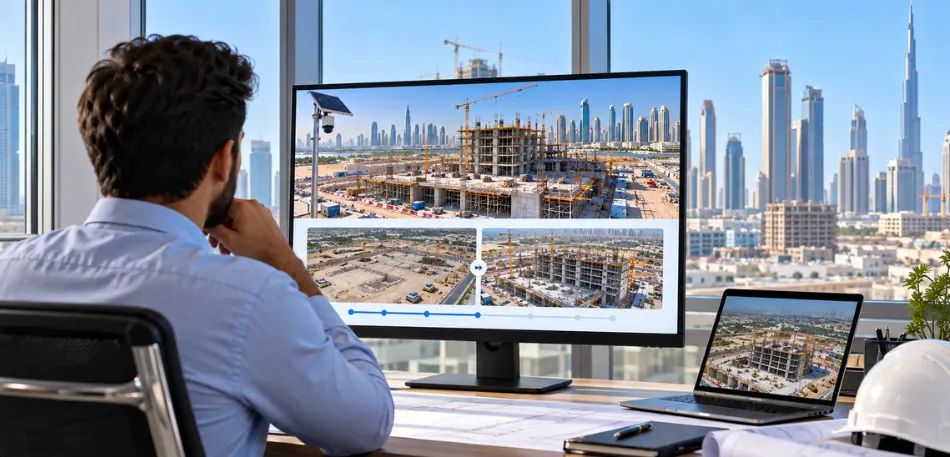
A manager based in Riyadh cannot stand on a Dubai site the same morning a concrete pour starts. Construction site monitoring closes that gap by giving off-site teams a dated visual record of what is happening on the ground. This guide covers how camera-based systems work, what they can and cannot do, and what to check before you pick one.
Construction Site Monitoring Without Daily Site Visits
Construction monitoring means tracking a build without standing on it every day. The usual tool is a set of timelapse cameras that shoot still images at set intervals and stitch them into a video of progress over weeks or months.
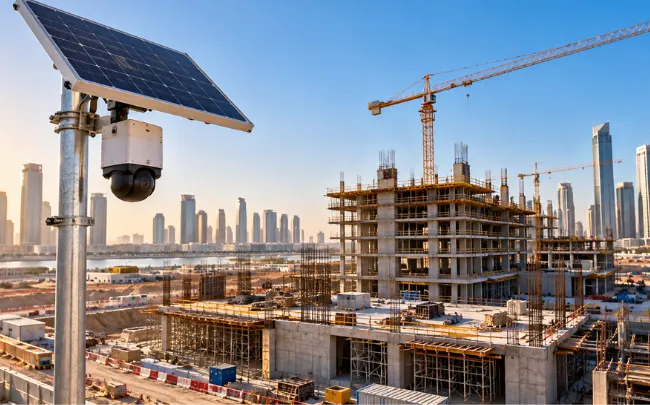
Modern platforms pair solar or mains-powered cameras with a single dashboard, and AI reads the footage so nobody scrubs through hours of it by hand. Construction monitoring services built this way suit contractors, developers, and consultants who need dated proof of progress.
Choosing a Camera for the Site You Have
Power and detail needs differ from site to site. Solar units suit sites without reliable mains electricity. Mid-range 12MP cameras cover standard progress records, while DSLR box versions at 24MP and 45MP suit sites where image detail matters most.
A 360° camera covers a full circle from fixed control points. A PTZ unit pans, tilts, and zooms from a single mounting point. Basic 4MP and 8MP cameras capture stills only, while dual-mode versions add live video. Facade documentation can call for resolutions up to 100MP.
Connection usually runs through built-in WiFi or a SIM, so patchy site internet is less of an obstacle. Sites that already have CCTV can often convert existing IP cameras instead of buying new hardware.
What a Remote Manager Actually Sees
Live view streams high-definition footage from any active camera. Image comparison places two dates side by side in a slider or split view, which helps catch work drifting from plan. Timelapse videos generate automatically, and custom cuts by date range, speed, or quality take a few clicks.
The AI layer tracks vehicles and people and flags hard-hat compliance, cross-referenced against historical weather data for the same dates. Reports are exported as PDF, on demand, or scheduled weekly, biweekly, or monthly. You can circle an issue, add a note, and send it on. A mobile app handles photo capture and upload, and integration with Procore and Autodesk BIM 360 keeps images next to existing project records. Satellite views, drone footage, and 360° panoramas can sit alongside the ground feed.
Cameras, CCTV, and Other Tools
Standard CCTV and timelapse cameras answer different questions. One published comparison from a timelapse provider says CCTV typically overwrites footage after a month and often needs four to six cameras for coverage that one or two timelapse units handle. Treat those as vendor figures and ask for specifics on your own site.
Other tools fill other gaps. A timelapse shows change over time, like a flipbook. A 3D laser scan is one exact snapshot, accurate to the millimeter, which suits BIM, as-built records, and disputes. Drone inspection reaches bridges, rooftops, and power lines without scaffolding the whole structure.
Limits, Safety, and Privacy
A camera records what sits in frame. It does not inspect workmanship, check structural work, or replace a qualified engineer or safety officer. Construction site monitoring supports judgment on-site; it does not stand in for it.
AI alerts need a human to check them. A hard-hat flag, whether missed or false, is a prompt for a conversation, not a compliance record. Safety duties stay with the people responsible on site.
Privacy needs care as well. Some security setups add facial detection and number plate recognition. Rules on biometric data, retention, and signage vary by country and client, so speak with a qualified legal or data protection adviser before switching those on.
Getting Started
Setup tends to follow three steps. Share your site details or the specs of any CCTV you want integrated. The provider installs and configures the system. You then sign in, and your feeds and timelapse videos go live.
Final Thoughts
Setup tends to follow three steps. Share your site details or the specs of any CCTV you want integrated. The provider installs and configures the system. You then sign in, and your feeds and timelapse videos go live.
FAQ
What's construction monitoring, really?
Think of it as keeping an eye on a build without standing on it. Timelapse cameras, drones, and laser scanners give you an accurate, dated picture of where things stand. It supports your judgment on site. It doesn't replace inspections.
Can I use the CCTV I already have?
Often, yes. Many platforms work with almost any existing IP camera or CCTV system. Gather your setup's specs first, since compatibility depends on the cameras, and ask the provider to confirm what is possible.
Will it work if the site has bad internet?
Usually. Cameras with built-in WiFi or SIM-based connectivity don't lean on site cabling. Signal strength still varies by location, so test coverage before you settle on a camera position.
Does the AI catch every safety problem?
No. It tracks vehicles and people and flags missing hard hats, but a person has to review every alert. Treat it as a nudge for a site conversation, and keep your qualified safety officer in charge of compliance.
Leave A Comment